

With the rise of token maxing, enterprise companies are getting pretty big bills to pay and running into the real costs of using AI.
But now that their engineers have been given AI superpowers, you can’t just walk them back. So, how can your engineers take advantage of the frontier of AI without breaking the bank?
Access
Before we can get to the specifics of models and reasoning efforts, we need to talk about how you access powerful AI tools in the first place.
Subscription Pricing Is Ultra Subsidized
According to June 2026 testing from SemiAnalysis:
A Claude Max 20x plan, which cost $200 a month, had an estimated maximum API-equivalent usage of $8,000 a month.
For ChatGPT Pro at the same price, that estimate was $14,000 a month.
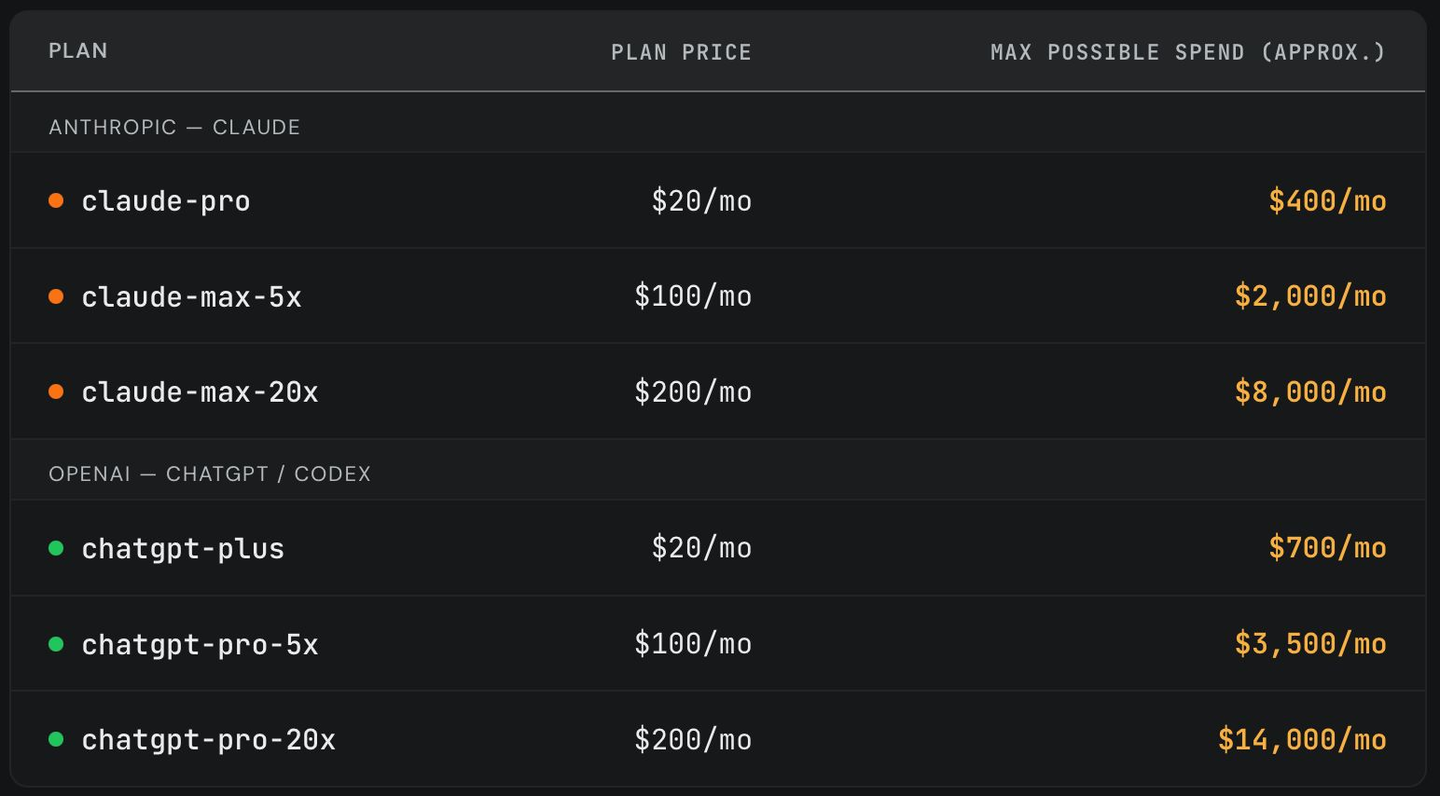
Amendment, September 9, 2026: Claude’s 5x and 20x labels apply to five-hour sessions, with separate weekly limits. They do not promise 5x or 20x Pro’s weekly usage. A proposed class action filed in June 2026 alleges that marketing was misleading. The $8,000 figure above is a historical estimate from SemiAnalysis testing, not a guaranteed monthly allowance.
The issue comes when you can’t use these subsidized subscriptions.
Enterprise Plans Use API Pricing Which Is EXPENSIVE
OpenAI and Anthropic, the ones offering these crazy subsidized subscriptions, don’t want you using them in enterprise settings. That would ruin their margin. Most of their profit comes from usage billed at API rates.
So if you’re a large company, you can’t be using their subsidized subscriptions. Instead, you can get one of their enterprise plans where you’re getting seats for each user in your company and you pay for usage, and that usage is billed at the API rates.
As you’ve seen from SemiAnalysis, API rates do not match up with the amount of usage users expect. If your engineers are used to one of these subsidized plans where they’re paying $200 a month for Claude Max, and then they find out that on their enterprise plan $200 only goes a twentieth as far, they’re going to be prone to overspending.
So, how can you manage these costs? Well, that mostly comes down to models and reasoning effort.
Models
The model you pick matters.
They have different pricing.
Tokens ≠ Tokens
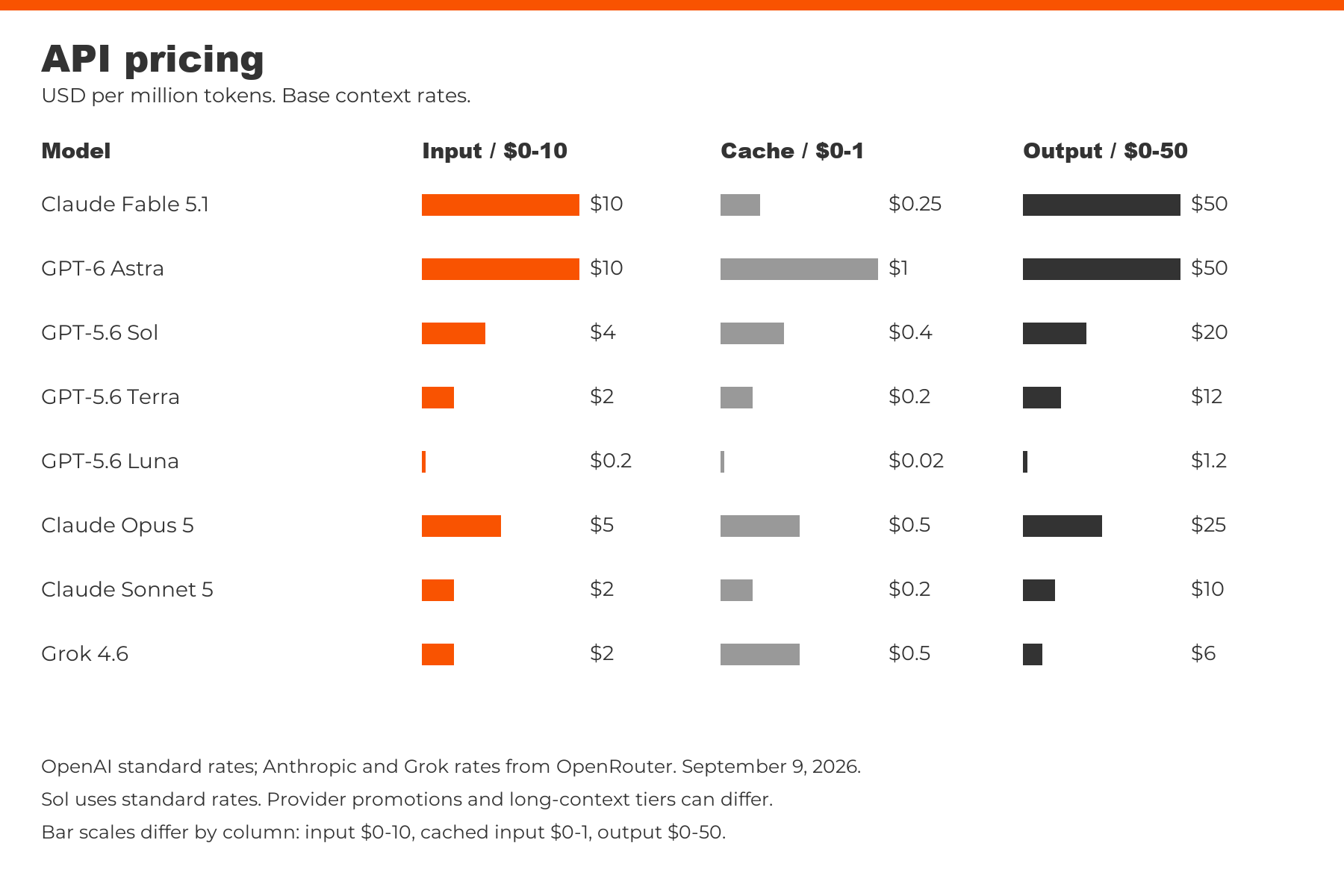
Different models charge different amounts for tokens. It is typically billed per million tokens, so you might see it in a format like $4 / $20 listed next to GPT-5.6 Sol. This means it costs $4 per million input tokens and $20 per million output tokens.
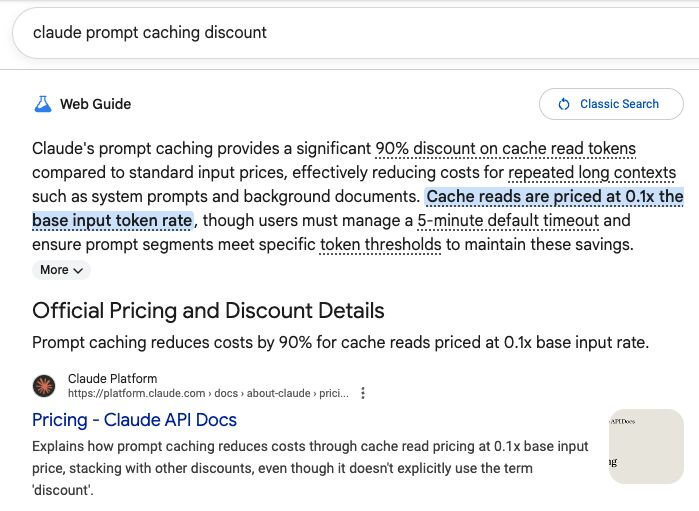
They also offer steep discounts for prompt caching. Roughly 10x. This applies when you are using the same input tokens as before, such as in a long thread. In that scenario, each turn the model takes will have most of the history remaining the same; since it does not need to be recomputed, they can offer a significant caching discount.
Token Efficiency
The cost per token is not the end of the story, though; that’s just the beginning. When models are doing work, they will use different amounts of tokens. Sometimes they can spend orders of magnitude more than other models.
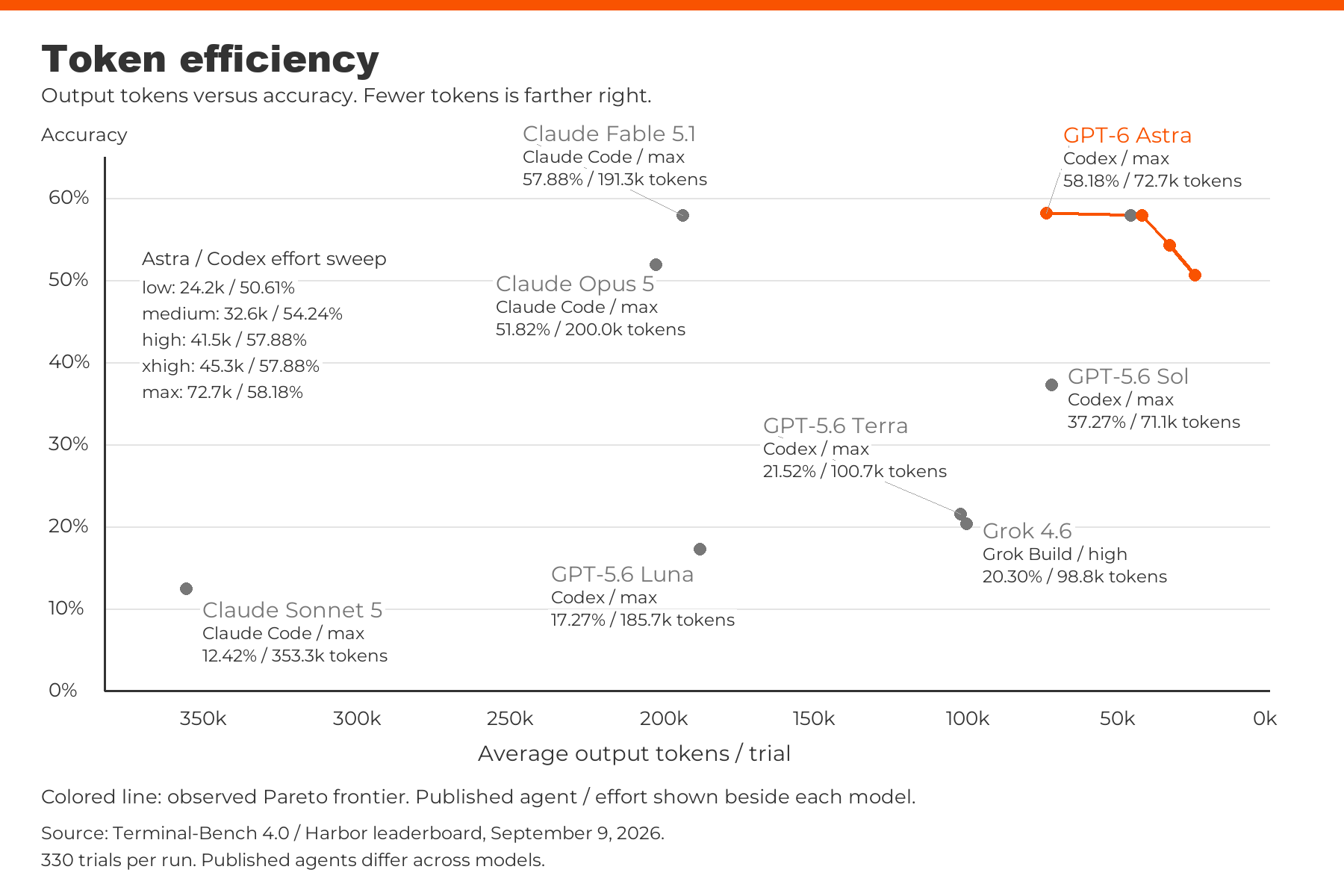
For example, in this chart using TerminalBench v4 data, we can see the following:
1. Claude Opus 5, at the maximum reasoning effort, averages 200,037 output tokens per trial.
2. GPT-6 Astra, at a medium reasoning effort, averages only 32,638 output tokens per trial, even though it costs more per token.
3. Even at extra high reasoning effort, GPT-6 Astra still averages only 45,304 output tokens per trial.
So, your choice of model is not just taking into account its pricing, but also the true cost after you consider how many tokens it’s actually going to use.
Qualitative Differences
There are quantitative differences between models that you can measure, like their pass rate on different benchmarks or their pricing information.
But there are also qualitative differences to these models. They have different tendencies and vibes to them that you can only really pick up on by using them.
For example, Gemini 3.8 Flash performs well on many benchmarks, but in developer experience, it tries so many random things and has so many annoying behaviors that, despite its scores on these benchmarks, it feels unusable.
The reason these qualitative differences matter is because it affects how you’re working with the models.
One qualitative difference people experienced was many models’ tendency to answer questions that didn’t actually make any sense as if they did, and come up with a nonsense answer.
Noticing this qualitative difference, Peter Gostev decided to measure it and created a benchmark called BSBench to measure this tendency that many models have. This shows a clear separation between Claude models and GPT models that, until this benchmark existed, was a purely qualitative vibe that people had.
This drastically changes how you use the models and how much you can trust them to push back on your wrong ideas.
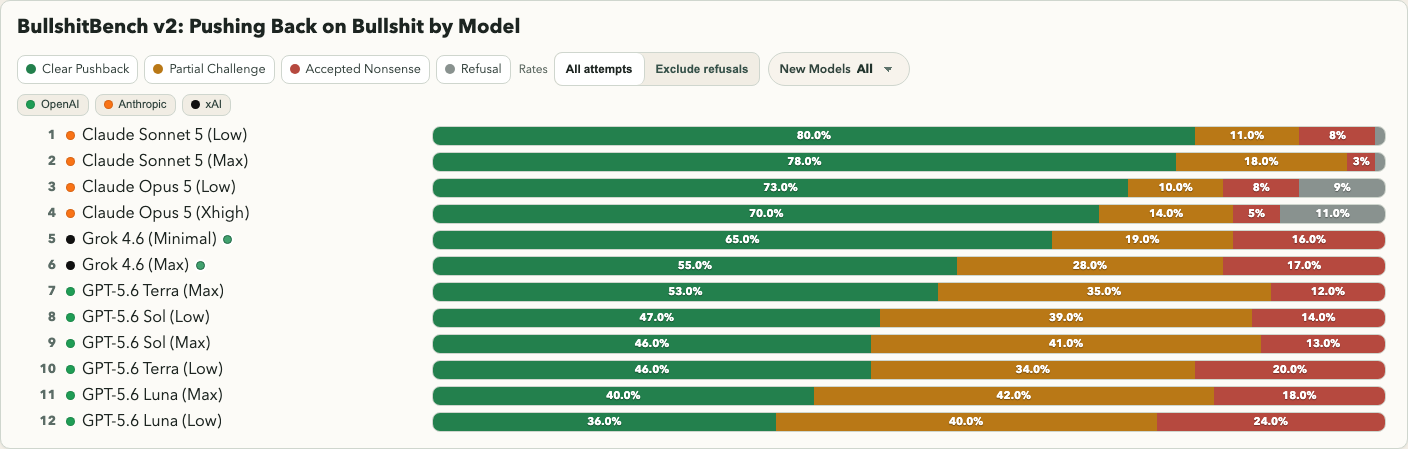
This is a big reason why choosing your models is so important. You get used to a model behaving in a certain way, and when they don’t meet your expectations, it can be frustrating.
There is a cost to model switching.
Reasoning Effort
Reasoning effort is important because it totally changes the cost-capability trade-off. Take a look at this chart using TerminalBench v4 data.
You might look at it and conclude that GPT-6 Astra is the best quality, but if I want to save some money, I can drop down to Sol, and that would be a reasonable option.
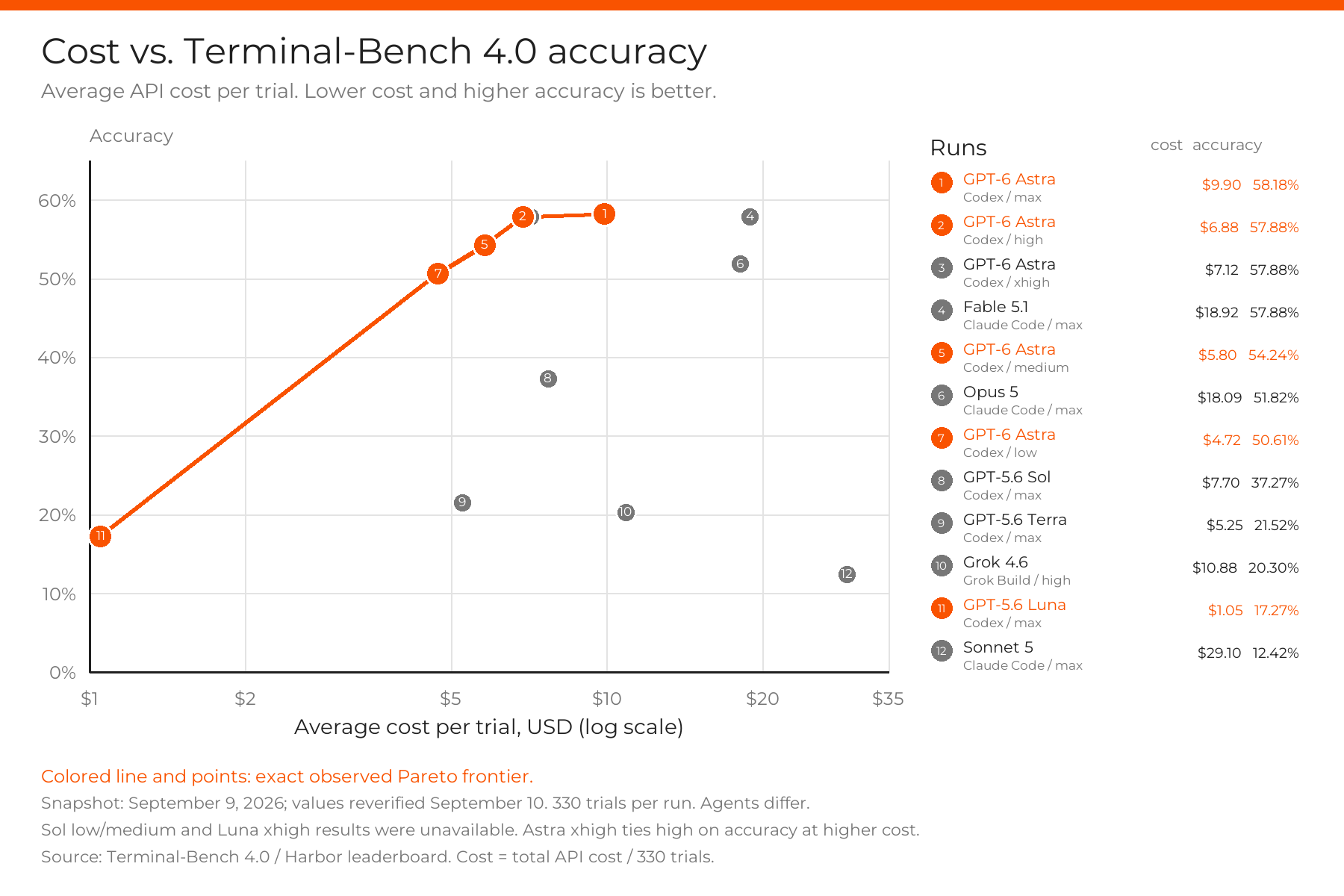
But that totally changes when you show the different effort levels available.
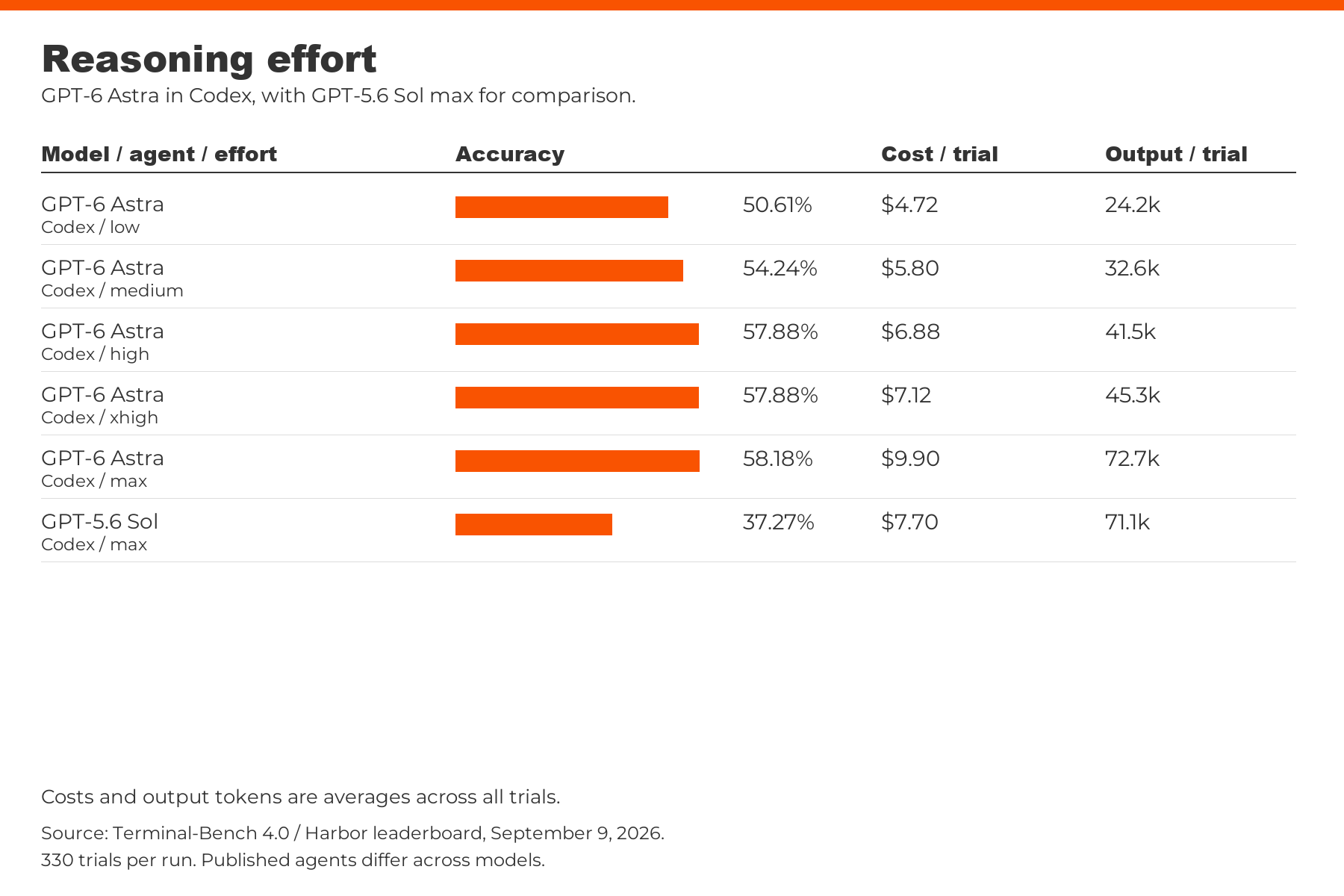
If you show the different available reasoning efforts, it becomes clear that instead of dropping down to Sol, you could instead lower your reasoning effort from max to high. It would cost less than Sol Max, but perform significantly better.
Cost Saving
Knowing how to properly use reasoning effort settings can also help save on costs, but changing them can break prompt caching. Sometimes within a given task, your model fails or you reach a major planning step where you want to bump up the intelligence.
If you switch to another, more powerful model, it is going to break the caching. Because different models are built totally differently, you have to recompute all of those input tokens from scratch.
Increasing reasoning effort within the same model can also break the cache. Whether it does depends on the implementation. Fable 5.1 supports cache-preserving changes through per-message effort settings, but changing the top-level effort setting still restarts the cache. Astra supports cache-preserving changes in the API through configuration_update, while keeping the request-level effort unchanged. As of September 9, 2026, switching Astra’s reasoning effort in my Codex setup still breaks cache. Knowing the differences between models doesn’t always mean it is worth switching in the middle of a task.
Which Harness You Use Matters
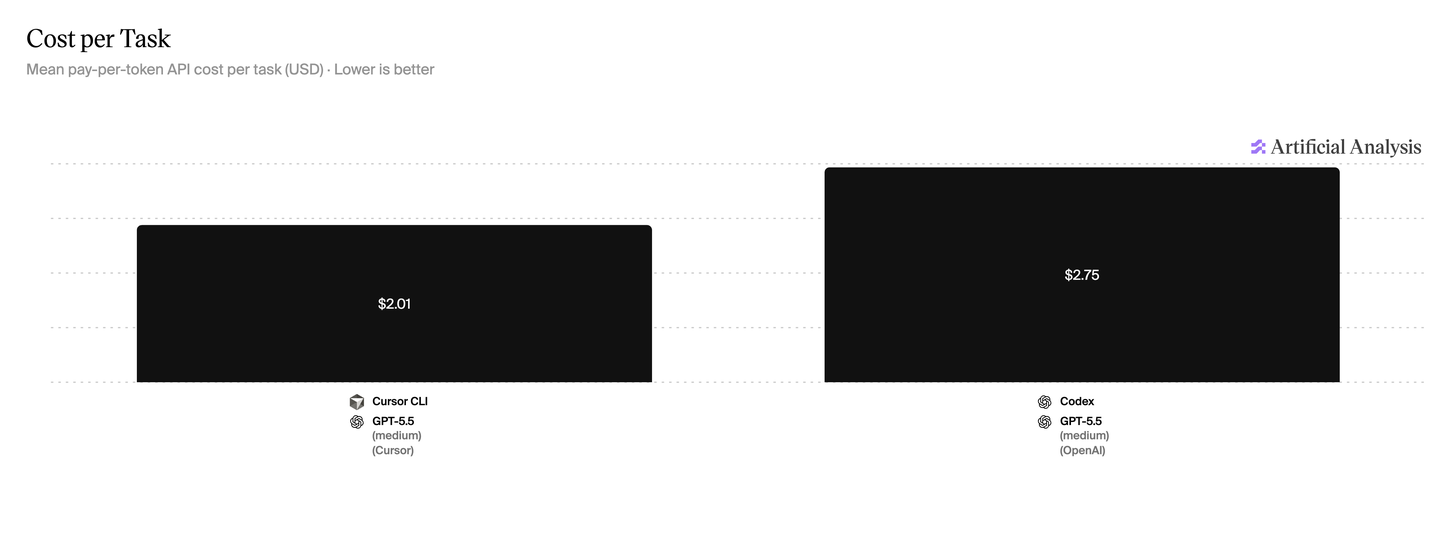
If you are using a plan that makes you pay API billing, it still matters which harness you’re using, because it can have significant effects on both performance and cost.
On the same benchmark with the same model and the same reasoning effort, Opus
4.7 can score:
1. 27% in Claude Code
2. 32% in Cursor
3. 40% in Opencode
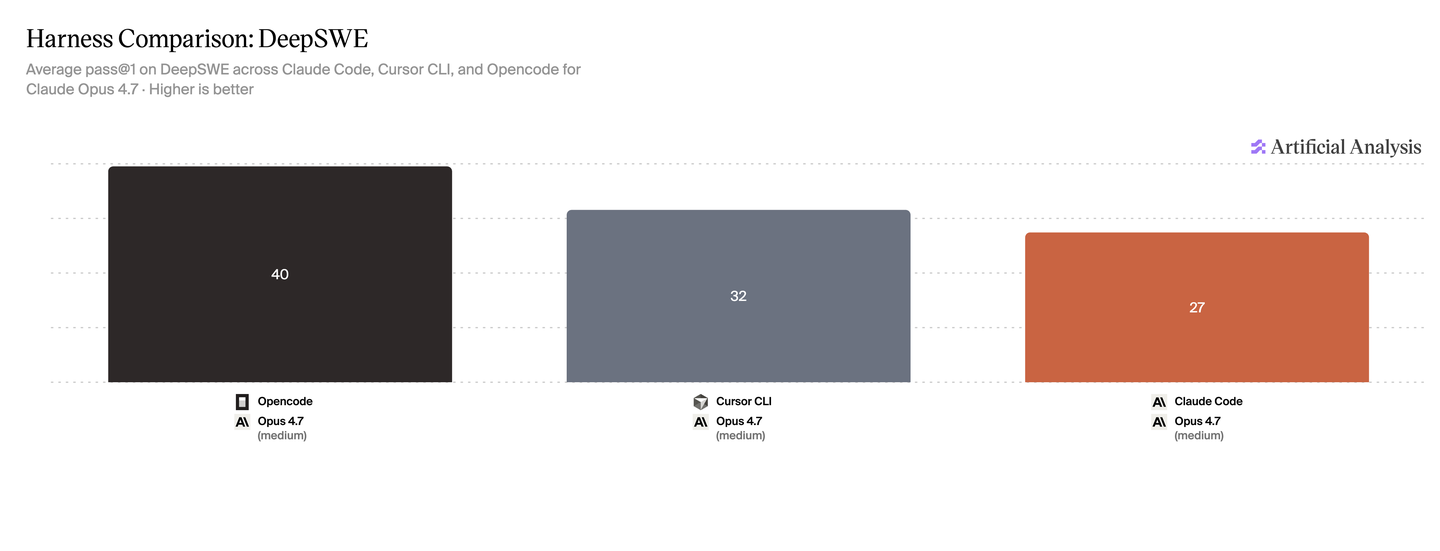
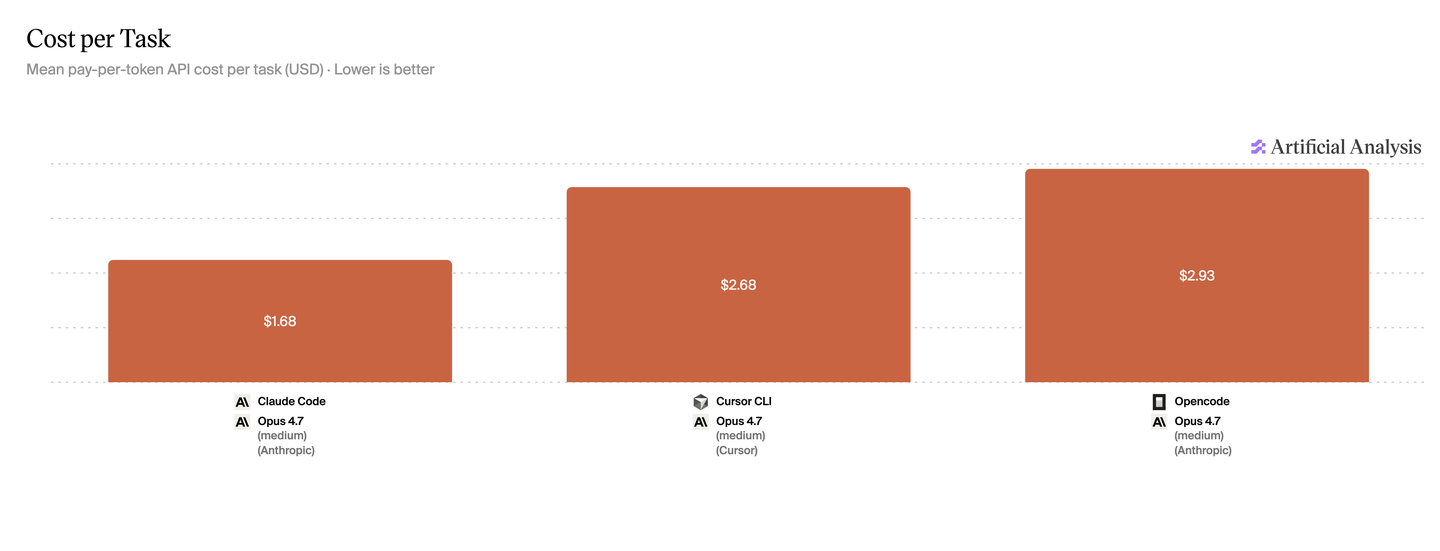
That might make it seem like Opencode is the obvious choice, then, but not so fast. It also changes the cost profile. Opencode uses the most tokens out of the three as well, and when you account for the cache hit rate on top of that, the costs per task break down as follows:
1. Opencode: $2.93
2. Cursor: $2.68
3. Claude Code: $1.68
So, you are trading off performance with cost yet again.
Not only are there quantitative differences between the different harnesses, but there are also qualitative ones. The way that each designs their interface, along with the prompts and systems they provide, suits them better for different tasks and leads to a different way of working with the model.
Cursor has spent a lot of time developing their “plan mode,” so you will notice it performs much better when you have it create a plan. It makes it really easy to plan with one model (which might be your more expensive, more powerful model) and then use a cheaper model for implementation.
However, if you lock yourself into the Claude Code ecosystem, you will be stuck using their models for everything, even when your engineers find that other models excel in different areas of their work.
Caching
DO NOT switch models in the middle of tasks to “save costs”
When you’re running tasks in something like Claude Code or Cursor, the model doesn’t need to constantly recompute the entire history of your session with every new prompt.
This is because of something called prompt caching.
Since all of your inputs up until your most recent prompt are the same, the system can just reuse the state of the model from before, which drastically reduces costs (often by more than 10x).
However, that cache is specific to the model.
If you are using Opus but realize halfway through that the task is relatively easy, switching to Sonnet won’t actually save you money.
Instead, the system has to recompute the entire session history for that new model.
Even though Sonnet might be half the cost at sticker price, you lose all the prompt caching benefits you had before, and it will end up being more expensive than if you had just kept using Opus.
If you still want to reduce costs, you can lower the reasoning effort to use fewer output tokens. But check whether your tool preserves the cache when you do. Rebuilding it can offset those savings.
If you want your engineers to optimize their token costs, make sure they know how to manage their reasoning effort and when their tool breaks the cache.
Subagents
Frontier models like Claude Fable 5.1 and GPT-6 Astra are really good at managing subagents, which means they can break up their work into many pieces that can be executed at the same time. This can speed up your work, but whether it saves money depends heavily on how the harness implements it.
The ideal version gives each task its own isolated context. You can have a smarter model organize the work, send a narrow task to a cheaper model on low reasoning, and only bring the result back. The main thread does not fill up with every file the agent read or every dead end it tried. That can save a lot of tokens, especially when the work is actually independent.
Codex subagents can use a different model and reasoning effort from the parent. You can request those settings in your prompt or configure subagent defaults. You no longer need a special flag to expose those controls. OpenAI documents the current options here.
Context still matters. Forking the whole thread can copy a large history into each subagent. If that history changes or you use a different model, you can lose prompt caching and pay to process it again. For independent tasks, give the subagent only the context it needs.
Using subagents used to require a lot of hand-holding, but the models have progressed to the point where they have a good intuition for how and when to use them. You mostly need to give them a little additional instruction about which models to use when they delegate work.
For example, you can just add one line:
1. In Codex, tell it to default its subagents to GPT-5.6 Terra on low reasoning, only using Sol when the task actually needs it.
2. In Cursor, have it use Composer 2.5 for its subagents to save costs, only using a smarter model when the task requires it.
The stronger model still organizes the work, gives the cheaper model its initial plan, and checks the result afterward. This avoids a lot of the downsides of using a cheaper model by itself. You are not asking the cheaper model to figure out the entire project. You are giving it one bounded piece of a plan created by a model that is better at knowing what the work should look like.
Cursor, Claude Code, and other harnesses implement subagents differently. Some start subagents with a clean context. Some let you assign models directly. The implementation determines whether subagents isolate expensive context or multiply it.
Tibo from OpenAI has been communicating well about these tradeoffs, and the team has already made efficiency improvements. This is still changing quickly. The important lesson is that “uses subagents” does not tell you whether a harness saves tokens. You need to know what context it copies, whether that breaks the cache, and which model and reasoning effort the child actually uses.
Data Retention
In many enterprise settings, you want zero data retention. The problem is, if you have zero data retention, you can’t take advantage of caching, which can reduce your costs drastically.
Using enterprise deals where you have agreements with some data retention for caching, backed by a trusted contract, works out much better when it comes to cost of use. But no data retention at all can be expensive. Keep that in mind.
By the way, if you need these compliance standards, most interfaces and tools for agentic coding don’t support them.
If you want to connect this to your Azure account with a BAA, I made Boxwood as a first-class experience for this:
boxwood.ironwoodai.com.
Code Is Free; Tokens Aren’t
Oftentimes, having your agent write a script to do something will be much cheaper than having it do the task itself.
For example, if you’re trying to scrape a bunch of leads from some site, you could have your agent navigate around the site with browser use to find the information you need. But that’s going to use a lot of tokens. Instead, you can have your agent write a script to scrape the data for it, and it’ll be a lot more efficient and
likely faster as well.
Keep in mind this hierarchy:
Only use computer use if browser use can’t handle the task.
Only use browser use if scripting can’t handle the task.
And only use scripting if a simple terminal command can’t handle the task.
Summary
- Astra on low reasoning is all you need for the vast majority of things. No need to raise the reasoning effort on Astra unless you’ve already tried it on low reasoning and it fails.
- If it’s simpler work, you can drop down to GPT-5.6 Sol on medium or low, which is still a good workhorse.
- For really simple work, Luna on extra high or max reasoning is dirt cheap and still pretty reliable for simple agentic work, though don’t expect taste and judgment from it.
I’ve also heard anecdotally that Fable 5.1 often writes nicer code to look at if you really care about that, but Astra will solve your problem.